

Introducing OrielOS
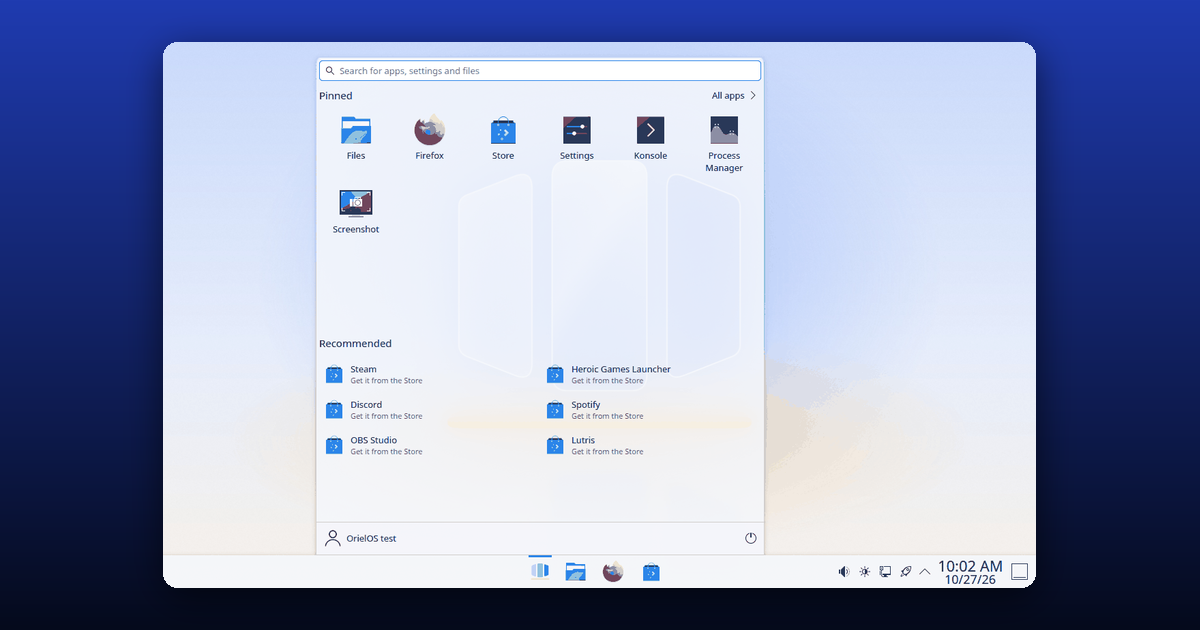
OrielOS is a free and open-source Linux desktop for PCs with NVIDIA RTX graphics, tuned for gaming and development and familiar from the first boot. Today its first installer is out, as version v0.0.7, together with this website's new guides, news and release notes.
Who it's for
OrielOS is for people who want to play their games and write their code on Linux without first learning how Linux works. If you're coming from Windows, the taskbar, Start, the keyboard shortcuts and Settings are where you expect them. Installing apps, updating, changing settings and running games all work without typing a command, and there's a proper terminal whenever you want one.
It's built on Fedora's image-based system and the KDE Plasma desktop. The whole system updates as one image: updates download in the background, apply when you restart, and if a new version gives you trouble you can go back to the previous one from Settings.
What works today
- The installer,
OrielOS.iso, starts with Secure Boot on, connects over Wi-Fi or a cable, and installs OrielOS on a whole drive or next to Windows. - The desktop: a centred taskbar, Start with search, pinned and recommended apps, snap layouts, light and dark themes, and OrielOS's own wallpapers, sounds, boot splash and sign-in screen.
- Settings, one app with pages for updates, the taskbar, the accent colour, power modes, accessibility and device security.
- The Store, with apps from Flathub, and Firefox from the first start. Steam from the Store finds the NVIDIA graphics card.
- The NVIDIA driver with Secure Boot on, after a one-time step on the first start, and boot settings that meet the requirements of Easy Anti-Cheat's Linux support.
- Updates with a way back, each one checked against its signature before it's installed.
All of this is tested automatically in virtual machines with Secure Boot on, for every change. It has also been checked on real hardware: a laptop with an NVIDIA GeForce RTX 4050 Laptop GPU, where the installer, Wi-Fi, Bluetooth, sound, the display, the NVIDIA driver under Secure Boot, the Store, Steam and a real update all work.
What's not there yet
OrielOS is in early development, and it's honest about it. Only one PC has run it so far, and the desktop PCs it's made for are next. No game has been played on it in testing yet, Windows programs that aren't games can't be opened with a double-click yet, and PCs with only AMD or Intel graphics aren't supported. The status page keeps the full list up to date, and known limitations explains what OrielOS won't do by design, such as Hibernate, and the games whose publishers block Linux.
What comes next
- Testing on desktop PCs with NVIDIA RTX graphics, and playing games on them.
- Gaming tools: Game Settings for per-game options, Will it run? to check a game before you buy it, an FPS overlay and a Gaming page in Settings.
- Run this app, to open Windows programs with a double-click.
- Benchmarks against Windows on the same PC, published with the method used.
- Version 1, once all of that works on real PCs; then AMD and Intel graphics, and translations.
Try it, follow along and help
- Try it: download the installer and follow Install OrielOS, or try it in a virtual machine first.
- Follow along: subscribe to this news feed, or watch the repository on GitHub for new releases.
- Talk to us: ask questions and share ideas in GitHub Discussions, or chat on the official Discord server.
- Help build it: code, docs, artwork and this website all take pull requests. The contributing guide is the place to start.